

Whether you’re belting it out on stage, recording in your home studio, or singing at a local open mic, knowing how to use a microphone correctly is a game-changer. Even the most beautiful voice can get lost in muffled, feedback-filled sound if mic technique isn’t right.
The good news? With a few essential tips—and a little practice—every singer can master the mic!
Choose the Right Microphone for Your Voice
Not every microphone is created equal. For most singers, the choice comes down to dynamic or condenser microphones:
- Dynamic microphones (like the classic Shure SM58) are sturdy, great for live shows, and handle loud volumes well.
- Condenser microphones are more sensitive, perfect for capturing studio-quality vocals and all the subtle nuances of your voice.
Think about where you’ll be singing and what fits your style. (Curious about which mic to buy? Stay tuned—I’ll be creating a separate guide on this soon!)
Adapting to Different Microphone Types
Different microphones have unique characteristics that can affect your performance. Being adaptable ensures you deliver a consistent sound, regardless of the equipment.
Tips for Adapting:
- Familiarize Yourself: Before a performance or recording session, spend time with the microphone to understand its response and sensitivity.
- Adjust Technique: For dynamic mics, you might need to project more, while condenser mics may require careful control of volume and articulation.
- Communicate with Sound Engineers: They can provide insights into the microphone’s characteristics and help you adjust your technique accordingly.
Hold the Microphone Correctly

Your grip can make or break your sound!
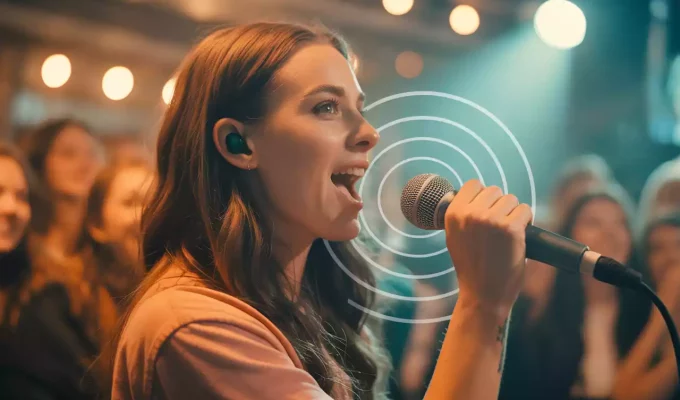
- Hold the microphone by the shaft, below the grille—never cup the round mesh top. This keeps your vocals clear and free from unwanted muffling or distortion.
- If using a mic stand, adjust it to mouth level. This lets you keep both hands free, so you can sing with good posture and even add some expressive gestures.
Find the Right Distance and Angle
- Distance: Aim to keep the mic about 1–2 inches from your mouth for normal singing. Move a bit closer for quiet passages, or back away slightly when you really belt.
- Angle: Point the mic slightly off to the side (not straight-on) to help prevent harsh “p” and “s” sounds (called plosives and sibilance).
Practice in front of a mirror to see your form, and experiment with moving the mic for different volumes.
Manage Popping and Sibilance
Ever heard an explosive “P” or hissy “S” through the speakers?
- Try this: Angle the mic just off-center, or experiment with a pop filter if you’re recording.
- Many of these issues also improve with practice—working on your enunciation and breath control will help!
Tame Feedback and Unwanted Noise
- Never point your mic at onstage monitors or speakers. This is a surefire way to create ear-piercing feedback.
- Always do a soundcheck and work with your sound engineer (if you have one) to get levels right before you sing.
- Avoid touching or tapping the mic—those thuds will be LOUD to your audience.
Move with Confidence—But Quietly!
Stage presence is important, but so is minimizing unwanted “handling noise.”
- Move the mic smoothly and intentionally—don’t fidget!
- If you’re using a wireless mic, treat it with care: stay aware of your distance from the receiver and avoid covering the antenna (often at the bottom).
- Setting your mic down? Try not to drop it or knock it—you don’t want to distract from your performance.
Avoid the Most Common Microphone Mistakes
- Don’t “cup” the mic (covering the grille with your hand). It can cause your sound to lose clarity, or create feedback.
- Don’t sing off-mic (wandering too far away). Your beautiful voice deserves to be heard!
- Never blow or tap into the mic to test it—instead, say “check” or “testing.”
Practice Good Microphone Etiquette and Care
- Wipe down the mic before and after you use it—especially on shared mics.
- Keep your mic safe in a case or pouch when traveling.
- When sharing equipment, always be gentle—your fellow singers will thank you.
Understanding the Proximity Effect
The proximity effect refers to the increase in bass or low-frequency response as a sound source moves closer to a directional microphone. This effect can add warmth to your vocals but may also lead to muddiness if not managed properly.
How to Manage the Proximity Effect:
- Maintain Consistent Distance: Keep the microphone at a steady distance (typically 1–2 inches) from your mouth to ensure a balanced sound.
- Adjust for Desired Tone: If you want a richer, bass-heavy sound, you can move slightly closer to the mic. Conversely, stepping back can produce a lighter tone.
- Practice Positioning: Experiment during rehearsals to find the optimal distance that complements your vocal style without compromising clarity.
Note: Omnidirectional microphones do not exhibit the proximity effect, so understanding your microphone’s pickup pattern is essential.
Practice Makes Perfect
Like learning a new song, microphone technique becomes second nature with practice! The more you play with distance, angle, and presence, the more you’ll find what works best for your unique voice.
Looking to sharpen your technique even further? Don’t miss these helpful resources: